> ## Documentation Index
> Fetch the complete documentation index at: https://wb-21fd5541-style-guide-models-runs-20260604-113608.mintlify.site/llms.txt
> Use this file to discover all available pages before exploring further.
> Rewind a run to correct or modify its history without losing original data.
# Rewind a run
Rewind a run to modify its history. When you rewind a run, W\&B resets the state of the run to the specified step while maintaining the same run ID. Use rewind to correct logged data or change the trajectory of an experiment from a specific point without starting a new run or losing the run's identity.
The ability to rewind a run is in active development. It is in preview for Multi-tenant Cloud and Dedicated Cloud, and not yet available in Self-Managed.
Because of known performance limitations with rewind, W\&B typically recommends [forking](./forking) as an alternative.
### Prerequisites
Before you rewind a run, ensure you meet the following prerequisites:
* To rewind a run, you must have the [W\&B Python SDK](https://pypi.org/project/wandb/) version `>=0.17.1`.
* You must use monotonically increasing steps. Rewind doesn't work with non-monotonic steps defined with [`define_metric()`](/models/ref/python/experiments/run#define_metric) because non-monotonic steps disrupt the required chronological order of run history and system metrics.
### Limitations
Rewind doesn't support the following:
* **Log rewind**: W\&B resets logs in the new run segment.
* **System metrics rewind**: W\&B logs only new system metrics after the rewind point.
* **Artifact association**: W\&B associates artifacts with the source run that produced them.
W\&B recomputes the summary metrics for the run you rewind based on the newly logged history. This produces the following behavior:
* **History truncation**: W\&B truncates the history to the rewind point, which allows new data logging.
* **Summary metrics**: W\&B recomputes summary metrics based on the newly logged history.
* **Configuration preservation**: W\&B preserves the original configurations, and you can merge new configurations.
### Rewind and forking compatibility
Forking complements a rewind.
When you fork from a run, W\&B creates a new branch off a run at a specific point so you can try different parameters or models.
When you rewind a run, you can correct or modify the run history itself.
## Rewind a run
To rewind a run from a specific step and log new data from that point, pass the run ID and step to the `resume_from` parameter in [`wandb.init()`](/models/ref/python/functions/init). The `resume_from` parameter accepts a string in the format `[RUN-ID]?_step=[STEP]`, where `[RUN-ID]` is the ID of the run you want to rewind and `[STEP]` is the step to rewind from.
The following example demonstrates the rewind workflow. Suppose you log a linear line for 300 steps:
```python theme={null}
import wandb
# Initialize the first run and log some metrics
with wandb.init(project="[PROJECT]", entity="wandb") as run:
for i in range(300):
# Plot a linear line
run.log({"metric": i, "step": i})
```
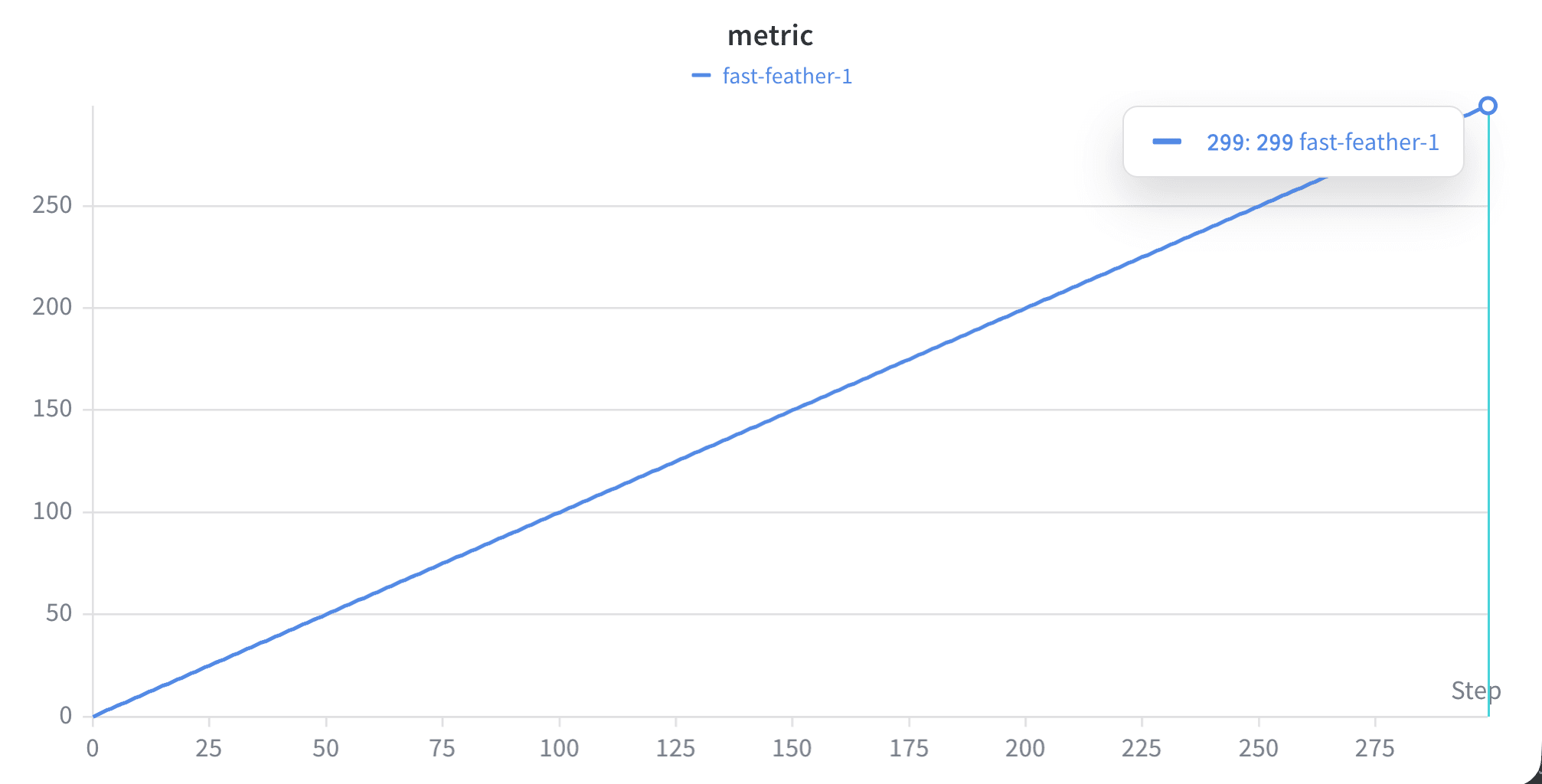
In your project's workspace, you see a line plot from step 0 to step 300:
 Later, you want to rewind the run from step 200 and log a metric called `additional_metric` that logs `i*1.1` from step 200 to step 300. From step 250, you want to log a subtle wavy pattern (`i**2 + 2*sin(i/3)`) instead of a linear line:
```python theme={null}
import math
run_ID = "[RUN-ID]" # Replace with the run ID of the run you want to rewind
# Rewind from the first run at a specific step and log the metric starting from step 200
with wandb.init(project="[PROJECT]", entity="wandb", resume_from=f"{run_ID}?_step=200") as run:
# For the first few steps, log the metric as is from run
# After step 250, start logging the wavy pattern
for i in range(200, 300):
if i < 250:
run.log({"metric": i, "step": i}) # Continue logging from run without waves
else:
# Introduce the wavy behavior starting from step 250
subtle_wave = i + (2 * math.sin(i / 3.0)) # Apply a subtle wavy pattern
run.log({"metric": subtle_wave, "step": i})
# Additionally log the new metric at all steps
run.log({"additional_metric": i * 1.1, "step": i})
```
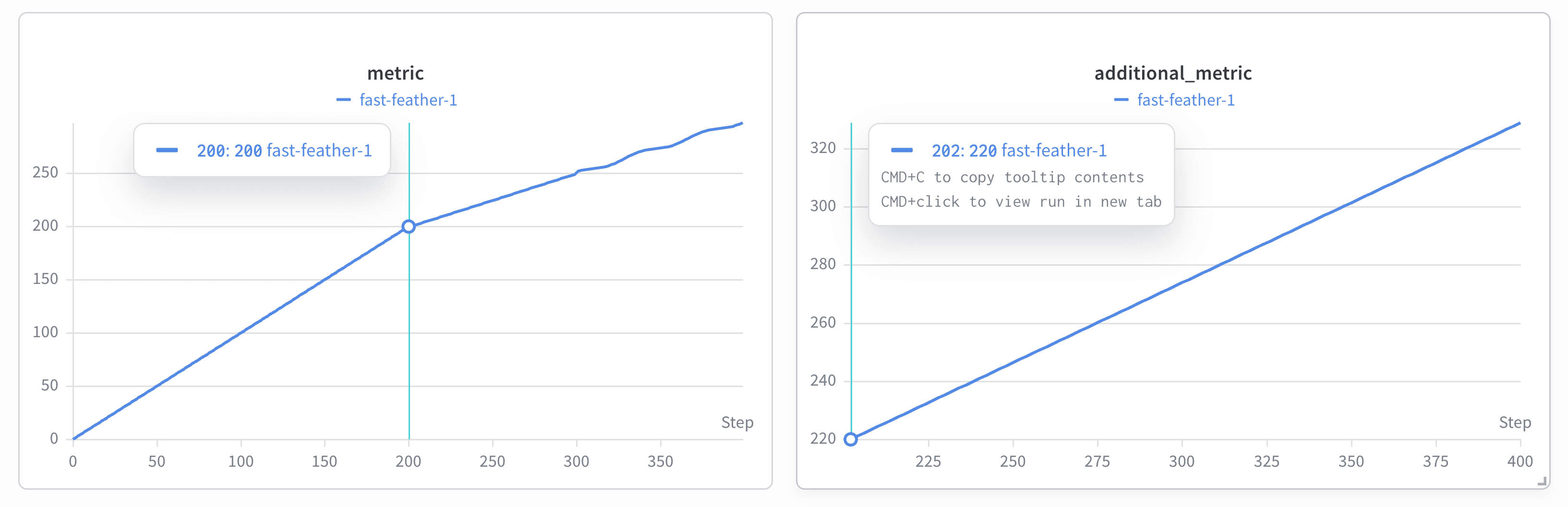
The following image shows the updated project's workspace. The plot shows these changes after the rewind:
* The line plot shows the original linear line from step 0 to step 200, and the subtle wavy pattern starts from step 250.
* W\&B creates a plot labeled `additional_metric` that starts from step 200.
Later, you want to rewind the run from step 200 and log a metric called `additional_metric` that logs `i*1.1` from step 200 to step 300. From step 250, you want to log a subtle wavy pattern (`i**2 + 2*sin(i/3)`) instead of a linear line:
```python theme={null}
import math
run_ID = "[RUN-ID]" # Replace with the run ID of the run you want to rewind
# Rewind from the first run at a specific step and log the metric starting from step 200
with wandb.init(project="[PROJECT]", entity="wandb", resume_from=f"{run_ID}?_step=200") as run:
# For the first few steps, log the metric as is from run
# After step 250, start logging the wavy pattern
for i in range(200, 300):
if i < 250:
run.log({"metric": i, "step": i}) # Continue logging from run without waves
else:
# Introduce the wavy behavior starting from step 250
subtle_wave = i + (2 * math.sin(i / 3.0)) # Apply a subtle wavy pattern
run.log({"metric": subtle_wave, "step": i})
# Additionally log the new metric at all steps
run.log({"additional_metric": i * 1.1, "step": i})
```
The following image shows the updated project's workspace. The plot shows these changes after the rewind:
* The line plot shows the original linear line from step 0 to step 200, and the subtle wavy pattern starts from step 250.
* W\&B creates a plot labeled `additional_metric` that starts from step 200.
 The run now contains the corrected history from step 200 onward while preserving the original run ID. W\&B also archives the original run so you can revisit it later.
## View an archived run
After you rewind a run, W\&B preserves the original run as an archived resumption that you can revisit at any time. Viewing the archived run lets you compare pre-rewind history with the current state and trace the sequence of rewinds applied to a run. To view an archived run in the W\&B App:
1. Navigate to the [**Overview** tab](/models/runs/view-logged-runs#overview) on the run's page. This tab provides a view of the run's details and history.
2. In the **Overview** tab, find the **Forked From** field. This field captures the history of the resumptions. The **Forked From** field includes a link to the source run, so you can trace back to the original run and review the entire rewind history.
Use the **Forked From** field to navigate the tree of archived resumptions and gain insights into the sequence and origin of each rewind.
## Fork from a run that you rewind
After you rewind a run, you can branch off the corrected history to explore alternate trajectories without modifying the rewound run itself. This is useful when you want to test alternate parameters or models from a known-good point in the corrected history. To fork from a rewound run, use the [`fork_from`](/models/runs/forking/) argument in `wandb.init()` and specify the source run ID and the step to fork from:
```python theme={null}
import wandb
# Fork the run from a specific step
forked_run = wandb.init(
project="[PROJECT]",
entity="[ENTITY]",
fork_from=f"{rewind_run.id}?_step=500",
)
# Continue logging in the new run
for i in range(500, 1000):
forked_run.log({"metric": i*3})
forked_run.finish()
```
The run now contains the corrected history from step 200 onward while preserving the original run ID. W\&B also archives the original run so you can revisit it later.
## View an archived run
After you rewind a run, W\&B preserves the original run as an archived resumption that you can revisit at any time. Viewing the archived run lets you compare pre-rewind history with the current state and trace the sequence of rewinds applied to a run. To view an archived run in the W\&B App:
1. Navigate to the [**Overview** tab](/models/runs/view-logged-runs#overview) on the run's page. This tab provides a view of the run's details and history.
2. In the **Overview** tab, find the **Forked From** field. This field captures the history of the resumptions. The **Forked From** field includes a link to the source run, so you can trace back to the original run and review the entire rewind history.
Use the **Forked From** field to navigate the tree of archived resumptions and gain insights into the sequence and origin of each rewind.
## Fork from a run that you rewind
After you rewind a run, you can branch off the corrected history to explore alternate trajectories without modifying the rewound run itself. This is useful when you want to test alternate parameters or models from a known-good point in the corrected history. To fork from a rewound run, use the [`fork_from`](/models/runs/forking/) argument in `wandb.init()` and specify the source run ID and the step to fork from:
```python theme={null}
import wandb
# Fork the run from a specific step
forked_run = wandb.init(
project="[PROJECT]",
entity="[ENTITY]",
fork_from=f"{rewind_run.id}?_step=500",
)
# Continue logging in the new run
for i in range(500, 1000):
forked_run.log({"metric": i*3})
forked_run.finish()
```